Docs
Everything the button does, how to talk to it, and how to build one. The virtual button and the hardware share one API and one set of limits.
Quick start
- Open the app, connect a wallet, sign one message. No transaction, no fee.
- Create a button. We generate its wallet on the server and encrypt the key with AES-256-GCM.
- Paste a coin contract address, set SOL per press, slippage, cooldown and daily caps. Save.
- Fund it from your wallet, up to 2 SOL. Press. Withdraw everything with one click whenever you want.
Limits
Every limit is checked on the server inside one database transaction, so two presses cannot race past a cap.
| Button wallet balance | Funding stops at 2 SOL |
| SOL per press | 0.001 to 1 |
| Cooldown | 5 s to 24 h |
| Daily SOL cap | Up to 10 SOL, resets at UTC midnight |
| Daily presses | Up to 500 |
| Slippage | 0.1% to 50% |
| Buttons per wallet | 3 |
A buy keeps about 0.004 SOL in reserve for the token account and fees. A sell needs about 0.0025 SOL for the temporary wrapped SOL account.
Pairing hardware
- In the app, open the button and press Pair a device. You get a 6 character code that lives 10 minutes.
- Hold the button while plugging in USB-C. After 3 seconds the ring pulses amber.
- Join the SMASHR-xxxx network from your phone. The setup page opens, or browse to 192.168.4.1.
- Pick your 2.4 GHz Wi-Fi, enter the password and the code. Green sweep: paired. It shows up in the app within a minute.
Hold for 10 seconds at any time to wipe Wi-Fi and pairing. Unpairing in the app kills the device secret instantly.
LED codes
| code | Ring | Meaning | Extra fields |
|---|---|---|---|
| ok | Green sweep | Swap sent and confirmed. reason=landing means sent, still confirming. | sig, tokens, sol, usd |
| cooldown | Amber drain | Inside the cooldown, or the daily SOL or press cap is used up. | retry_in (s), reason |
| insufficient | Red double blink | Wallet is short: low_sol, no_tokens, low_sol_for_fees. | reason |
| error | Red solid | Nothing spent: not_configured, paused, no_route, slippage, swap_failed, unpaired, bad_signature, replay, clock_skew. | reason |
Device API
Three endpoints. Pairing is unauthenticated (the code is the secret); everything after is signed with the 64 character device secret returned by pairing.
POST /api/device/pair    {"code":"K7QF2M","hw":"34:85:18:..","fw":"1.0.0"}
-> {"device_id":"SI4RX9TQ2B","secret":"<64 hex>","server_time":1791796716,"button":{...}}

POST /api/device/press   (signed) {"event":"press","seq":12,"rssi":-58,"fw":"1.0.0"}
-> {"code":"ok","sig":"5h..","tokens":3241400,"symbol":"Bonk","sol":0.1,"usd":11.16,"led":"green_sweep","ms":1840}

POST /api/device/ping    (signed, every 60 s) {"event":"ping","rssi":-58,"fw":"1.0.0"}
-> {"ok":true,"server_time":1791796776,"button":{"mode":"buy","symbol":"Bonk","cooldown_s":30,...},"ota":null}
Signing: concatenate the unix timestamp, a fresh random nonce and the exact request body with dots, HMAC-SHA256 it with the secret (as ASCII bytes), send the hex digest.
x-sendit-device: SI4RX9TQ2B
x-sendit-ts:     1791796716               // within 120 s of server time
x-sendit-nonce:  9f1c0e7a5b2d4c6e8a0b1c2d3e4f5a6b   // 16-64 hex, accepted once
x-sendit-sig:    hex(HMAC_SHA256(secret, ts + "." + nonce + "." + body))
// Node, for testing a device secret from a terminal
import { createHmac, randomBytes } from "node:crypto";
const ts = Math.floor(Date.now() / 1000), nonce = randomBytes(16).toString("hex");
const body = JSON.stringify({ event: "press", seq: 1, fw: "cli" });
const sig = createHmac("sha256", SECRET).update(`${ts}.${nonce}.${body}`).digest("hex");
await fetch("https://smashr.fun/api/device/press", { method: "POST", body,
headers: { "content-type": "application/json", "x-sendit-device": DEVICE_ID,
"x-sendit-ts": String(ts), "x-sendit-nonce": nonce, "x-sendit-sig": sig } });Every response carries server_time; the firmware keeps an offset from it so a bad NTP sync never locks the button out.
Firmware
Arduino sketch for ESP32-S3 (core 3.x) with Adafruit NeoPixel and ArduinoJson 7. The LED ring runs on its own FreeRTOS task, so the comet keeps spinning while HTTPS blocks. Updates arrive over HTTPS through the heartbeat.
arduino-cli core install esp32:esp32
arduino-cli lib install "Adafruit NeoPixel" "ArduinoJson"
arduino-cli compile --fqbn esp32:esp32:XIAO_ESP32S3 firmware/sendit
arduino-cli upload  --fqbn esp32:esp32:XIAO_ESP32S3 -p /dev/cu.usbmodem* firmware/sendit
Bill of materials
Single-unit retail prices in USD, October 2026. DIY total: 39 with a printed shell, 73 with CNC aluminium.
| Part | Spec | Qty | USD |
|---|---|---|---|
| Controller | Seeed Studio XIAO ESP32S3, Wi-Fi 2.4 GHz, USB-C | 1 | 7.49 |
| Button | 100 mm arcade dome with microswitch (Adafruit 1185) | 1 | 9.95 |
| LED strip | WS2812B 60/m, cut to 24 px, coiled in a 127 mm channel | 1 | 3.00 |
| Level shifter | 74AHCT125, 3.3 V to 5 V data | 1 | 1.50 |
| Resistor | 330 ohm in series with LED data | 1 | 0.05 |
| Capacitor | 1000 uF 6.3 V across LED power | 1 | 0.30 |
| Diffuser | 3 mm frosted PC ring, laser cut | 1 | 2.50 |
| Weight plate | 3 mm steel disc, 122 mm | 1 | 4.00 |
| Enclosure | 6061 aluminium shell + tray, CNC (DIY: PETG print) | 1 set | 38.00 |
| Feet | Silicone bumpers, 12 mm | 4 | 0.40 |
| Fasteners | M3 x 8 + heat-set inserts | 4 + 4 | 0.60 |
| Wire | 22 AWG silicone, 3 colors | 1 set | 1.20 |
| Cable | USB-C to USB-C, 1 m braided | 1 | 3.00 |
Wiring
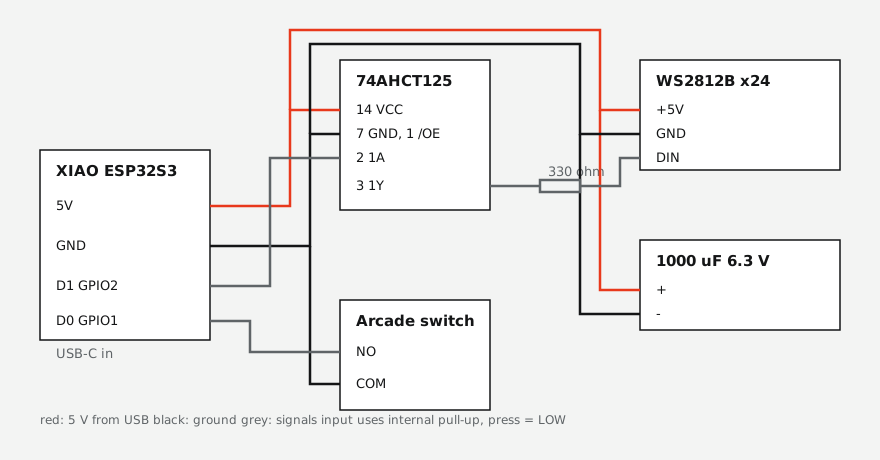
- D0 / GPIO1 to switch NO, COM to GND. Internal pull-up, press reads LOW.
- D1 / GPIO2 to 74AHCT125 1A, 1Y through 330 ohm to the strip DIN.
- 5V straight from USB to the strip, with 1000 uF across it at the strip end.
FAQ
- Is this a real, physical button?
- Yes. A 140 mm aluminium arcade button with a 100 mm cap, a 24-LED ring and a loud microswitch. It plugs into USB-C, joins your Wi-Fi and ships to your door. The virtual button is just to hold you over.
- Can I put any coin on the cap?
- Any token Jupiter can route from SOL. Paste the contract address in the builder, we pull its logo and pad-print it on the dome. The button buys that coin.
- Does the button hold my private key?
- No. It holds a device secret that can request a press. The swap is signed on our server by a separate button wallet you fund with a capped amount and can empty at any time.
- What if I switch coins later?
- Switch the coin in the dashboard whenever the button wallet holds none of the old one. The cap keeps its print, which makes a good story.
- What stops a cat from buying 400 times?
- A cooldown between presses, a daily SOL cap, a daily press cap and a hard 2 SOL ceiling on the wallet. All enforced on the server, not the device.
- Can it sell?
- Yes. Flip the button to sell mode and each press sells a set percentage of what it holds back to SOL.
- When does hardware ship?
- Batch one ships Nov 1 to every country our carrier serves. Orders get the virtual button right now with the same limits.
- Is this a custodial wallet?
- Partly, on purpose. The button wallet key sits encrypted on our server so a press works without your phone. That is why it is capped at 2 SOL and why withdraw is one click.
- Which wallets can sign in?
- Anything that speaks wallet-standard and can sign a message: Phantom, Solflare, Backpack and most others.